Motherboards button
Placas-mãe
Graphics Card button
Placa de video
Monitors button
Monitor Gamer
Power Supply button
Fonte de alimentação
AIO Liquid Coolers button
AIO Liquid Coolers
Mini PC button
Mini PC
Industrial PC button
PC Industrial
Server/WS button
Servidores/Estações
Loading

Usamos cookies para oferecer uma experiência mais personalizada e suave.
Ao visitar este site, você concorda com o nosso uso de cookies. Se preferir não aceitar cookies ou exigir mais informações, visite nossa Política de Privacidade.
Perguntas Frequentes

Caso você saiba a categoria da sua dúvida, você pode escolher uma das categorias abaixo para perguntas frequentes. Catalogo:

Resultados:
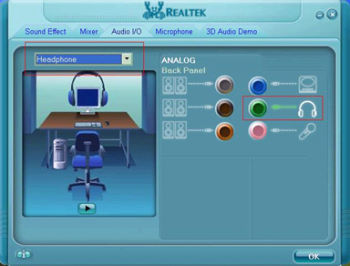
Q (193): I plugged a headphone in my ASRock motherboard with Realtek HD Audio, and set the "Audio I/O" from "2CH" to "Headphone" in Realtek Audio Manager (picture1).

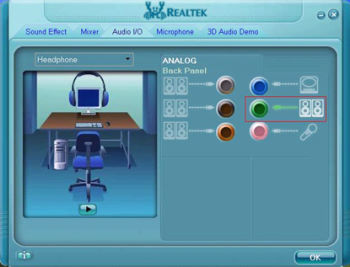
But the Realtek Audio Manager always recognized my headphone as 2CH speaker after I restarted the operating system (picture2).

What should I do?(2007/1/16)
A:Please refer to the following steps to set up the Realtek Audio Manager correctly.
1.Please remove all audio I/O (Headphones, Speakers, Microphone...) from the motherboard.
2.Please go to Realtek Audio Manager and set the "Audio I/O" you want.
3.Click ok.
4.Please plug your audio I/O back.
5.Restart your system.